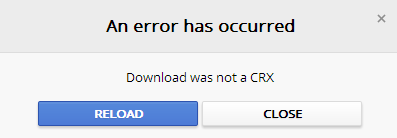
When you try to install a Google Chrome extension show the following error message:
An error has occurred
Download was not a CRX
RELOAD CLOSE
Effect:
Not install the required extension.
Solution from your comments: (Prefered because it respects your privacy but not always works)
Open Google Chrome,
click the Chrome menu  on the browser toolbar then select New incognito window
or
press Ctrl+Shift+N
then open the page of extension in this mode, if you don’t know the url you can copy and paste in the incognito window the following:
https://chrome.google.com/webstore/category/extensions
search the extension and click on ADD TO CHROME to install.
Note: If you chose this solution you have to repeat the above steps everytime you want to install a new extension because it will always appear the same error. Whenever, you have to open an incognito window.
My Solution:
Sign in into Google before to try to install an extension.
To Sign in or Sign up in to Google Chrome, open Google Chrome
click the Chrome menu on the browser toolbar then select Sign in to Chrome
or
using the following link:
Google Accounts
Did my solution solve your problem? Leave a reply.
36 replies on “Google Chrome extension – “Download was not a CRX””
It worked.
Hi, thank you for your comment
Shitty solution. Install the extension in a incognito windows instead.
Hi, I accept your comment and thank you for it, I’ll add your solution but I don’t approve your language. Please, more polite.
Didn’t solve anything
Hi, I’m sorry, thank you for your comment. Please give me more information about your actions and if the error message is the same so I can try to help you.
second solution worked, first one didn’t. Incognito window had same error message. Had to login to Google account, then didn’t need incognito window.
Hi Chet Valdes, thank you for your comment, I needed a confirm because first solution (from comment) was not verified from me.
incognito first time round did not work — second time round – I used your link after I opened in incognito — same error message what WHOLLA — CAGE was up and running 🙂 Very nice indeed — thank YOU!!!!!!
oops meant to read BUT Wholla
Hi, thank you for your comment, I don’t understood very well your actions, I’m happy that you solved your problem but I’d like have more info. You say that in second round show in incognito windows the same error, what page you opened? Do you confirm that first solution works with the steps written? Let me know
Worked perfectly first try – thanks!
Hi, thank you for your comment. I’m happy to help you. What solution? First or second?
hello, thx for your advices. its kinda weird. i tried the first solution and it worked. but then after i closed the incognito window and tried to download another theme, it doesnt work anymore. so i tried the second solution that’s working till now. :3
Hi Samada, thank you for your comment. I added a note to my post to clarify the first solution.
The “incognito window” trick did work! Thanks a lot!
Hi Max, thank you for your comment
Incognito window worked!
thank you
Thank you for your comment
THank you
Thank you for your comment
Thank you for solving that annoying issue.
Hi, thank you for your comment
Why does it work to download the extension in an incognito window?
Hi, thank you for your comment. I haven’t right answer to your question because I don’t work in Google (I’d like). I think that in Google want know who download Chrome extension so they require Sign in before but if you use their Incognito Windows skip this check. Their error message is not clear so I wrote in my post my solution.
[…] Google Chrome extension – “Download was not a CRX”. […]
Hi, thank you for your pinback. If you want you can subscribe to receive update and new post alert automatically
It worked for me. Thanks, and a beer is on its way!
Hi itsintheblood,
Thank you for your comment, I’m happy to help you. Thank you for your support (the beer is arrived but has not yet been drunk), it’s very important for the life of this site. I suggest you to subscribe so receive automatically new posts.
Thanks, work great:))
Hi,
thank you for your comment
neither solution has worked for me. neither does deleting the old “default” folder in …/chrome/user data. any other suggestions? I should mention that I’m on work computer with a fresh Windows 7 install. I was previously on Windows XP and adding chrome extensions worked fine.
Hi,
I tried your both methods, but still could not install extensions, got the same error message: an error has occurred, download interrupted. I am using iMac, Google Chrome 27.0.1453
I have many extensions installed, not sure why now could not install any, tried to install a few, all failed.
Any methods I can try?
Thanks
Hi tanventure,
unfortunately I haven’t a Mac 🙁
Are you sure that you logged in? Is this your first extension that you are installing? Can you provide me the extension name?
I have many extensions installed, this time trying to install SmartVideo for youtube because somehow on my Chrome youtube did not buffering at all.
Thanks for your quick help
Hi tanventure,
I just installed this extension without problems. Try to close and reopen Chrome or to check if your current user can access to this folder
/Users/username/Library/Application Support/Google/Chrome/Default/Extensions
My last suggestion is to contact support of this extension
https://chrome.google.com/webstore/support/lnkdbjbjpnpjeciipoaflmpcddinpjjp?hl=en&gl=IT#bug